

Co-Founder Setup (ChatGPT)
This setup is easiest on desktop.
When finished, you can use the co-founder on any device.
Step 1: Open the Co-Founder Setup Document
Step 2: Make a Copy
Select File -> Make a copy.

Rename the document "[Your Business] Co-Founder".
Then, select "Make a copy".

Step 3: Create a Project
In ChatGPT, select "New Project".

Rename the project "Co-Founder".
Then, select "Create project".

Step 4: Add System Prompt
Select "System Prompt" in the left panel.
Then, copy the system prompt.

In ChatGPT, select the three dots in the top right.
Then, select "Project Settings"

Paste the system prompt into the "Instructions" section.
Then, select "Save".

Step 5: Complete the Business Pillars
Fill in the details for each pillar of the setup:
-
Business Core
-
Solution Strategy
-
Market Entry & Growth
-
Brand Expression
-
Management System
-
Project Monitoring Framework

Step 6: Download the Setup
Go to File -> Download -> PDF Document (.pdf).

Then select "Export".

Step 7: Add Setup to Co-Founder
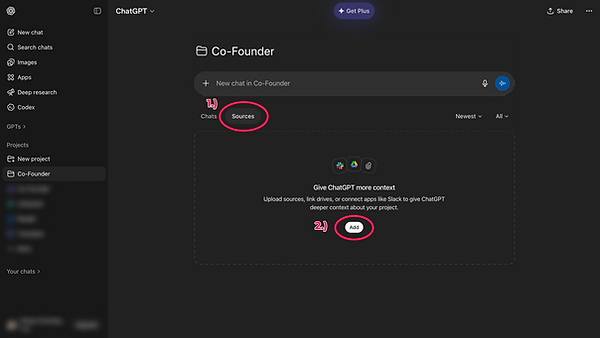
In ChatGPT, select "Sources" and then select "Add".
After, locate the setup file on your computer and upload it.
Step 8: Start Your First Chat
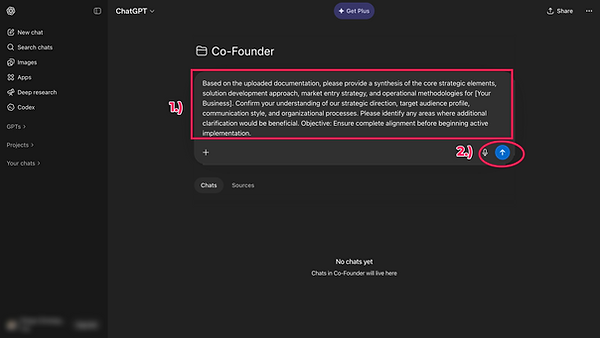
After uploading your setup, initiate your first chat by copying the prompt in the final tab titled "First Chat Prompt".

Paste the First Chat Prompt into a new ChatGPT chat.
Then start the conversation.
The chat will walk you through a series of questions to ensure absolute clarity on:
-
What it knows about you
-
Where it needs clarification
-
What to expect moving forward
Setup is complete. You’re now positioned for dramatically better, highly targeted AI insights that help you avoid expensive strategic errors and capture high-value returns.